Map (marvin.tools.quantities.Map)
Introduction
Map is a single map for a single galaxy. The main data that it contains are the value, ivar, and mask arrays of the map. It also has some meta data and convenience functions, such as plot(), which wraps the marvin.utils.plot.map.plot() method.
Getting Started
To get a map, we first need to create a marvin.tools.maps.Maps object, which contains all of the maps for a galaxy.
from marvin.tools.maps import Maps
maps = Maps(plateifu='8485-1901')
By default, Maps returns the unbinned maps SPX, but we can also choose from additional bintypes (see the Technical Reference Manual for a more complete description of each bintype and the associated usage warnings):
SPX- spaxels are unbinned,VOR10- spaxels are Voronoi binned to a minimum continuum SNR of 10,NRE- spaxels are binned into two radial bins, binning all spectra from 0-1 and 1-2 (elliptical Petrosian) effective radii, andALL- all spectra binned together.
maps = Maps(mangaid='1-209232', bintype='VOR10')
Once we have a Maps object, we can “slice” it to get the H\(\alpha\) (Gaussian-fitted) flux map.
ha = maps['emline_gflux_ha_6564']
ha.plot()
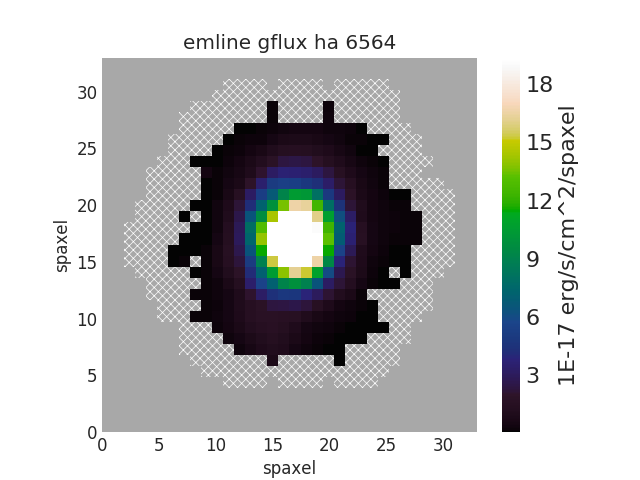
Here maps['emline_gflux_ha_6564'] is shorthand for maps.getMap('emline_gflux', channel='ha_6564'), where the property and channel are joined by an underscore (“_”). For properties without channels, such as stellar velocity, just use the property name like maps['stellar_vel'].
ha = maps.getMap('emline_gflux', channel='ha_6564')   # == maps['emline_gflux_ha_6564']
stvel = maps.getMap('stellar_vel')                    # == maps['stellar_vel']
New in 2.2.0: You can guess at the map property name (and channel), and Marvin will return the map if there is a unique (and valid) property and channel.
maps['gflux ha']        # == maps['emline_gflux_ha_6564']
maps['gvel oiii 5008']  # == maps[emline_gvel_oiii_5008]
maps['stellar sig']     # == maps['stellar_sigma']

# There are several properties of the Halpha line (velocity, sigma, etc.).
maps['ha']  # ValueError

# There are two [O III] lines.
maps['gflux oiii']  # ValueError
The values, inverse variances, and bitmasks of the map can be accessed via the value, ivar, and mask attributes, respectively.
Important: These arrays are ordered as [row, column] with the origin in the lower left, which corresponds to [y, x].
ha.value  # (34, 34) array
ha.ivar   # (34, 34) array
ha.mask   # (34, 34) array --- same as ha.pixmask.mask

ha.value[17]  # get the middle row (i.e., "y")
# array([  0.        ,   0.        ,   0.        ,   0.        ,
#          0.        ,   0.        ,   0.03650022,   0.03789879,
#          0.0838113 ,   0.16109767,   0.57484451,   1.42108019,
#          2.98873795,   7.47787753,  14.08300415,  21.61707138,
#         28.37593542,  31.47541953,  28.29092958,  20.82737156,
#         13.33138178,   6.90730005,   3.70062335,   1.54131387,
#          0.55510055,   0.34234428,   0.21906664,   0.18621548,
#          0.1745672 ,   0.        ,   0.        ,   0.        ,
#          0.        ,   0.        ])
The masked attribute is a numpy masked array. The data attribute is the value array and the mask attribute is a boolean array. mask is True for a given spaxel if any of the recommended bad data flags (NOCOV, UNRELIABLE, and DONOTUSE) are set (New in 2.2.0; previously, spaxels with any flags set were masked—i.e., where ha.mask > 0).
ha.masked[17]
# masked_array(data = [-- -- -- -- -- -- -- 0.03789878599602308 0.08381129696903318
#                      0.1610976667261473 0.5748445110902572 1.421080190438372 2.988737954927168
#                      7.477877525388817 14.083004151791611 21.61707138246288 28.37593542372677
#                      31.475419531155 28.290929579722462 20.827371557790272 13.331381776434451
#                      6.907300050577721 3.7006233506234203 1.5413138678320422 0.5551005467482618
#                      0.3423442819444342 0.2190666373241594 0.18621548081774594
#                      0.17456719770757587 -- -- -- -- --],
#              mask = [ True  True  True  True  True  True  True False False False False False
#                       False False False False False False False False False False False False
#                       False False False False False  True  True  True  True  True],
#              fill_value = 1e+20)
New in 2.2.0: For more fine-grained data quality control, you can select spaxels using pixmask, which contains the mask values, knows the MANGA_DAPPIXMASK schema, and has convenience methods for converting between mask values, bit values, and labels.
See Maskbit (marvin.utils.general.maskbit.Maskbit) for details.
ha.pixmask
# <Maskbit 'MANGA_DAPPIXMASK'
#
#     bit         label                                        description
# 0     0         NOCOV                         No coverage in this spaxel
# 1     1        LOWCOV                        Low coverage in this spaxel
# 2     2     DEADFIBER                   Major contributing fiber is dead
# 3     3      FORESTAR                                    Foreground star
# 4     4       NOVALUE  Spaxel was not fit because it did not meet sel...
# 5     5    UNRELIABLE  Value is deemed unreliable; see TRM for defini...
# 6     6     MATHERROR              Mathematical error in computing value
# 7     7     FITFAILED                  Attempted fit for property failed
# 8     8     NEARBOUND  Fitted value is too near an imposed boundary; ...
# 9     9  NOCORRECTION               Appropriate correction not available
# 10   10     MULTICOMP          Multi-component velocity features present
# 11   30      DONOTUSE                 Do not use this spaxel for science>

ha.pixmask.mask    # == ha.mask
ha.pixmask.bits    # bits corresponding to mask array
ha.pixmask.labels  # labels corresponding to mask array
Note: For MPL-5+, DONOTUSE is a consolidation of the flags NOCOV, LOWCOV, DEADFIBER, FORESTAR, NOVALUE, MATHERROR, FITFAILED, and NEARBOUND. For MPL-4, the MANGA_DAPPIXMASK flag is simply 0 = good and 1 = bad (which roughly corresponds to DONOTUSE).
Using Map
For more in-depth discussion of using Map, please see the following sections:
Map Plotting
Map Arithmetic
New in 2.2.0 Map objects can be added, subtracted, multiplied, divided, or raised to a power.
ha = maps['emline_gflux_ha_6564']
nii = maps['emline_gflux_nii_6585']

sum_ = nii + ha
diff = nii - ha
prod = nii * ha
quot = nii / ha
pow_ = ha**0.5

prod
# <Marvin EnhancedMap>
# array([[ 0.,  0.,  0., ...,  0.,  0.,  0.],
#        [ 0.,  0.,  0., ...,  0.,  0.,  0.],
#        [ 0.,  0.,  0., ...,  0.,  0.,  0.],
#        ...,
#        [ 0.,  0.,  0., ...,  0.,  0.,  0.],
#        [ 0.,  0.,  0., ...,  0.,  0.,  0.],
#        [ 0.,  0.,  0., ...,  0.,  0.,  0.]]) 'erg2 / (cm4 s2 spaxel2)'
In addition to performing the arithmetic operation on the value, the resulting EnhancedMap has correctly propagated ivar, mask, pixmask, unit, and scale.
Accessing the Parent Maps Object
One of the most useful features of Marvin is the tight integration of the Tools. From a Map object we can access its parent Maps object via the maps attribute and meta data about the Property via the property attribute.
ha.maps == maps  # True

ha.property
# <Property 'emline_gflux', release='2.0.2', channel='ha_6564', unit='erg / (cm2 s spaxel)'>
Saving and Restoring a Map
Finally, we can save() our Map object as a MaNGA pickle file (*.mpf) and then restore() it.
from marvin.tools.quantities import Map
ha.save(path='/path/to/save/directory/ha_8485-1901.mpf')
zombie_ha = Map.restore(path='/path/to/save/directory/ha_8485-1901.mpf')
Common Masking
# Spaxels not covered by the IFU
nocov = ha.pixmask.get_mask('NOCOV')

# Spaxels flagged as bad data
bad_data = ha.pixmask.get_mask(['UNRELIABLE', 'DONOTUSE'])

# Custom mask (flag data as DONOTUSE to hide in plotting)
custom_mask = (ha.value < 1e-17) * ha.pixmask.labels_to_value('DONOTUSE')

# Combine masks
my_mask = nocov | custom_mask
Reference/API
Class Inheritance Diagram

Class
marvin.tools.quantities.Map |
Describes 2D array object with addtional features. |
Methods
marvin.tools.quantities.Map.error |
Computes the standard deviation of the measurement. |
marvin.tools.quantities.Map.inst_sigma_correction() |
Correct for instrumental broadening. |
marvin.tools.quantities.Map.masked |
Return a masked array using the recommended masks. |
marvin.tools.quantities.Map.pixmask |
Maskbit instance for the MANGA_DAPPIXMASK flag. |
marvin.tools.quantities.Map.plot(*args, **kwargs) |
Make single panel map or one panel of multi-panel map plot. |
marvin.tools.quantities.Map.restore(path[, …]) |
Restore a Map object from a pickled file. |
marvin.tools.quantities.Map.save(path[, …]) |
Pickle the map to a file. |
marvin.tools.quantities.Map.snr |
Return the signal-to-noise ratio for each spaxel in the map. |